 Fredy Store
UpLocal
AI upscaling for your videos and photos, 100% on your Mac. Video to Full HD or 4K, photos up to 8K. No cloud, no subscription.
macOS 13 or later · Apple silicon (M1 or later) · Signed and notarized by Apple
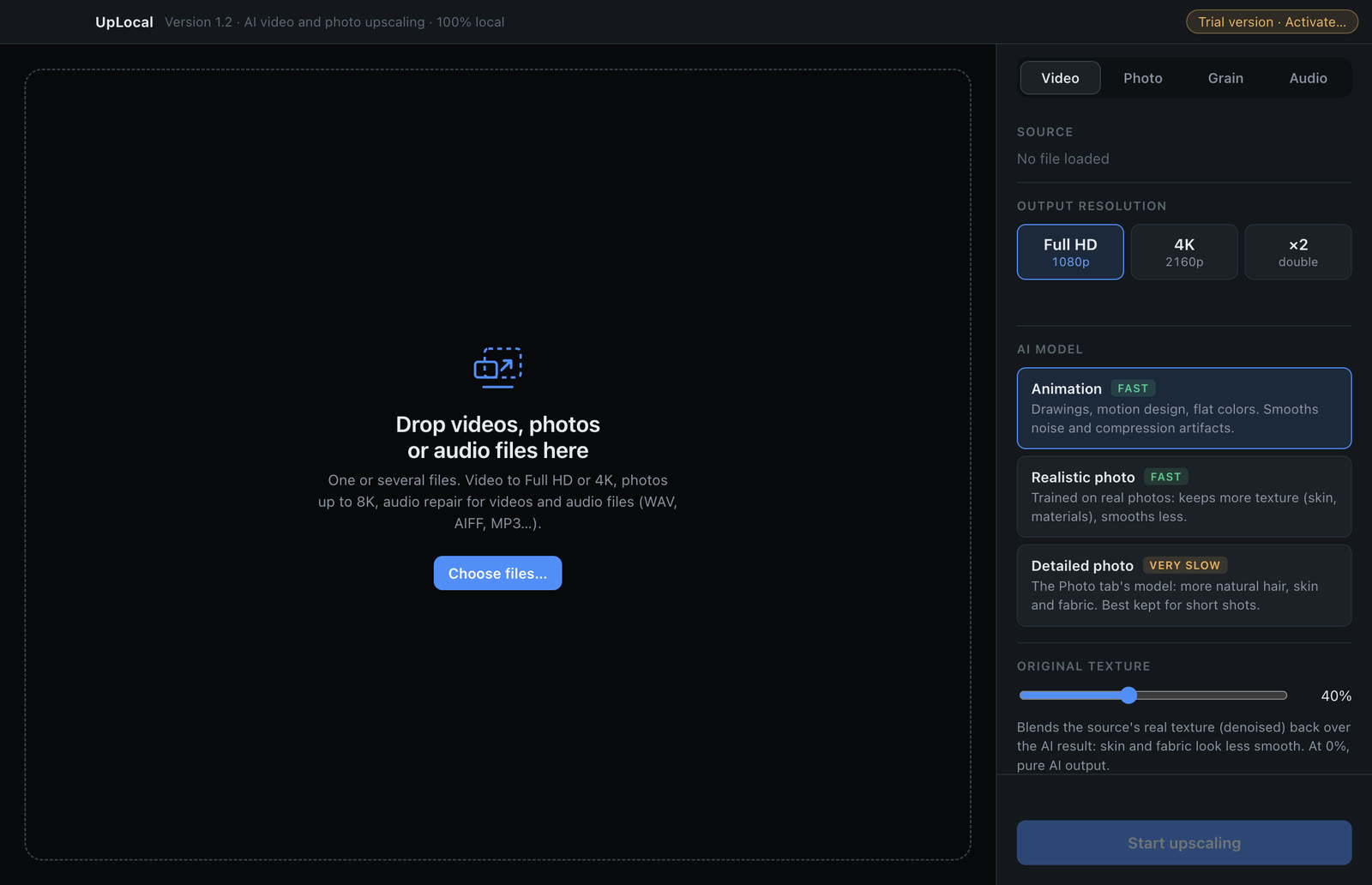
Drop your files, choose the output size, compare before and after, export.
See the difference
Drag the slider. Left: the original simply enlarged. Right: the same image upscaled by UpLocal. Shown zoomed in on a detail.

 BeforeUpLocal
Portrait: 1024 × 816 → 4096 × 3264 (×4). Zoomed detail, shown at the output resolution.
How it works
Three steps, and everything stays on your Mac.
Drop your files
Videos, photos or audio files, one at a time or a whole batch. UpLocal picks the right tab for each file.
Choose and compare
Pick the output size and the AI model, then check the result on a frame with the before / after preview.
Export
UpLocal shows the estimated time, processes the files one after the other and saves them next to the originals.
Four tools in one app
For old footage, archive photos, social media clips and everything shot in a lower resolution than you need today.
Video upscaling
To Full HD, 4K or double size, with three AI models: animation and motion design, realistic footage, or maximum detail for short shots.
Photo upscaling
×2, ×4 or ×8, up to 8K. A realism setting keeps the real texture of skin and materials instead of an over-smoothed look.
Film grain
Add a fine, medium or coarse film grain to an upscaled video, or to any video without changing its resolution.
Audio repair
Voice enhancement, reverb reduction, podcast level and mastering, for videos and audio files. Listen to a 12-second excerpt first.
Before / after preview
Compare the original and the result side by side, zoom in to 100% or 200%, before spending any time on the export.
Private by design
No upload, no account, no cloud credits: your files are processed by your Mac and never leave it.
Simple pricing
Try it for free: the trial lets you load your files, preview the result and listen to the audio repair. The license unlocks exporting.
- Lifetime license, no subscription
- Use it on 2 Macs
- All version 1 updates included
- Secure card payment
Your license key is emailed to you right after purchase, and stays available in your account.
Frequently asked questions
What do I need?
A Mac with Apple silicon (M1 or later) running macOS 13 or later. Intel Macs are not supported. Upscaling uses the graphics processor of your Mac: the more recent the Mac, the faster it goes.
How long does it take?
It depends on the length of the video, its resolution and the model you choose. UpLocal shows an estimated time before you start. Photos take from a few seconds to about a minute; the “Detailed photo” model is much slower and best kept for short shots.
Which files can I open?
Videos (MP4, MOV, M4V, MKV, WebM, AVI and more), photos (JPEG, PNG, HEIC, TIFF, WebP) and audio files (WAV, AIFF, MP3, M4A, FLAC and more). Videos are exported in H.264, H.265 or ProRes 422 HQ; photos in JPEG or PNG.
Are my files sent anywhere?
No. Everything is computed on your Mac. Only the license check connects to the internet, and it sends nothing about your files.
What does the trial do?
Everything except exporting: you can load your files, compare before and after on your own footage and listen to the audio repair. Activate a license to export.
What language is the app in?
UpLocal follows your Mac's language: French if your Mac is set to French, English otherwise.
Where do I find my license key and invoices?
In your account. Sign in with the email address you used to buy: you receive a one-time code, no password needed. Your orders, invoices and license keys for all Fredy Store apps are there.
How do I activate my license?
Click “Trial version” at the top right of the UpLocal window, paste your key and click Activate.
I'm switching Macs. What should I do?
Click “Licensed” at the top right of the window, then “Release this Mac”. You can then activate the key on your new Mac.
Do I need an internet connection?
Only to activate the license, and then for a quick check from time to time. The app keeps working for 30 days offline.
A question, a problem?
Write to us at contact@fredystore.com.